
Become Expert Web Developer Beginner to Advanced Levels

5 Levels to Become Expert Web Developer: Beginner to Advanced Levels

Discover 5 levels to become expert web developer in Pakistan, from beginner basics in HTML/CSS to advanced full-stack skills like React, Node.js & Laravel.

1. Beginner Level – Understanding the Basics

At the beginner level become expert web developer in Pakistan, the focus is on learning the foundational skills required for web development.

  • Learn HTML, CSS, and JavaScript to build simple web pages.
  • Understand how websites work and the structure of web pages.
  • Practice basic coding exercises and small projects to gain confidence.
  • Explore simple web hosting and domain concepts.

2. Intermediate Level – Building Dynamic Websites

Once the basics are clear, the next step is learning to create interactive and dynamic websites.

  • Learn front-end frameworks like React, Angular, or Vue.js.
  • Start working with version control systems like Git and GitHub.
  • Learn basic backend development using Node.js, Python (Django/Flask), or PHP.
  • Practice building responsive websites that work across devices.

3. Advanced Level – Full-Stack Development

At this stage, you combine front-end and back-end skills to become a full-stack developer.

  • Master databases like MySQL, MongoDB, or PostgreSQL.
  • Learn APIs and how to connect the frontend with the backend.
  • Understand authentication, security, and user management.
  • Work on full-stack projects like e-commerce websites or blogs.

4. Expert Level – Specialization and Optimization

Expert web developers focus on performance, scalability, and advanced technologies.

  • Learn advanced JavaScript frameworks and libraries.
  • Optimize website performance, speed, and SEO.
  • Explore cloud services like AWS, Azure, or Google Cloud.
  • Understand best practices for scalable and maintainable code.

5. Mastery Level – Real-World Projects & Continuous Learning

Becoming a master requires hands-on experience and continuous learning.

  • Work on real-world projects, freelance, or contribute to open-source.
  • Stay updated with the latest web development trends and tools.
  • Learn advanced topics like progressive web apps (PWAs), serverless architecture, and AI integration.
  • Build a strong portfolio to showcase your expertise to employers or clients.

FAQs

Q1: How long does it take to become an expert web developer?
It depends on dedication and practice, but typically 1–3 years from beginner to advanced level.

Q2: Do I need a degree to become a web developer?
No, self-learning and practical experience can be enough to become successful.

Q3: Which programming languages should I start with?
HTML, CSS, JavaScript are essential. Later, you can learn backend languages like Python, PHP, or Node.js.

Q4: Can I become a web developer while working full-time?
Yes, with consistent learning and practice, you can progress gradually.

Q5: Is it necessary to learn both frontend and backend?
Learning full-stack is recommended for better opportunities, but you can specialize in frontend or backend as well.


Conclusion

Becoming an expert web developer requires a step-by-step approach, starting from the basics and gradually progressing to advanced and mastery levels. Continuous practice, real-world projects, and keeping up with new technologies are key to building a successful career in web development.
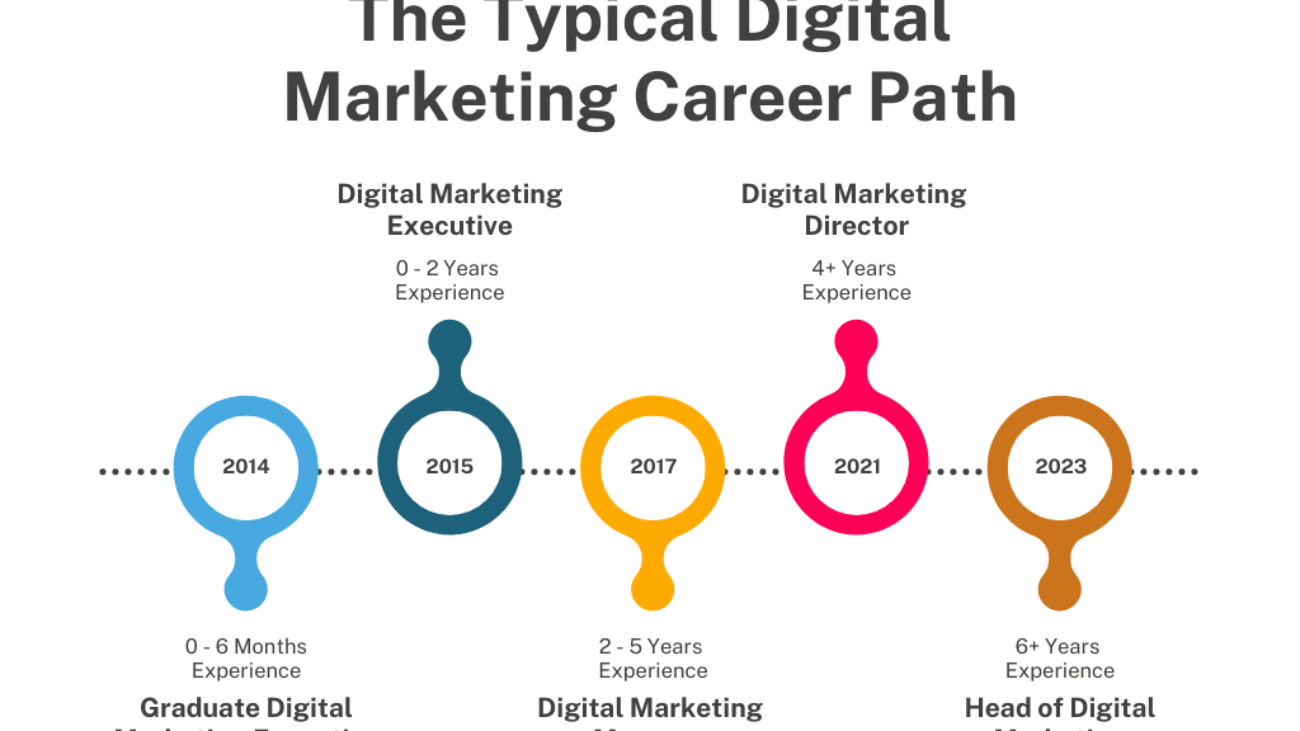

Career Opportunities After Digital Marketing Course in Pakistan

Career Opportunities After Digital Marketing Course in Pakistan

Explore top career opportunities after completing a digital marketing course in Pakistan. Discover high-demand jobs like SEO specialist, social media manager.

1. SEO Specialist

An SEO specialist focuses on improving website visibility on search engines like Google.

  • Keyword research and competitor analysis
  • On-page and off-page optimization
  • Technical SEO improvements
  • Local SEO for businesses and services

2. Social Media Manager

This role involves managing and growing brand presence on social platforms.

  • Facebook, Instagram, LinkedIn, and TikTok management
  • Content planning and scheduling
  • Paid social media advertising
  • Audience engagement and growth

3. Google Ads & PPC Expert

PPC professionals manage paid advertising campaigns for instant results.

  • Google Search and Display Ads
  • YouTube advertising campaigns
  • Conversion tracking and reporting
  • Budget optimization and ROI improvement

4. Content Marketer

Content marketers create valuable content to attract and retain audiences.

  • Blog writing and copywriting
  • Video and visual content creation
  • AI-based content tools
  • Content strategy and planning

5. Email Marketing Specialist

This role focuses on customer retention and lead nurturing.

  • Email campaign creation
  • Marketing funnels and automation
  • AI-powered email tools
  • CRM and customer data management

6. Digital Marketing Analyst

Analysts track performance and improve marketing strategies using data.

  • Google Analytics usage
  • Conversion and event tracking
  • User behavior analysis
  • Campaign performance optimization

7. Freelancing & Business Opportunities

Digital marketing also allows independent and remote work options.

  • Freelancing with local and international clients
  • Starting a digital marketing agency
  • Offering SEO, social media, or ads services
  • Growing personal brands or online businesses

FAQs

Q1: Is digital marketing a good career choice?
Yes, digital marketing offers high demand, flexible work options, and strong growth potential.

Q2: Can beginners start a career in digital marketing?
Yes, a digital marketing course is beginner-friendly and skill-based.

Q3: How long does it take to get a job after the course?
Many learners start internships, freelancing, or entry-level jobs within 2–3 months.

Q4: Can I earn online after completing a digital marketing course?
Yes, freelancing, remote jobs, and personal projects are common income sources.

Q5: Does AI reduce digital marketing job opportunities?
No, AI enhances productivity and creates new career opportunities in digital marketing.


Conclusion

A digital marketing course opens doors to multiple career opportunities across industries. With practical skills, modern tools, and growing online demand, digital marketing remains a strong and future-proof career choice.

Canva vs Adobe Tools: Pros and Cons for Designers

1. Overview of Canva

Canva is a cloud-based graphic design tool that is beginner-friendly and ideal for quick designs.

  • It offers thousands of pre-made templates for social media posts, flyers, and presentations.
  • Canva uses drag-and-drop functionality, making it accessible to users with little or no design experience.
  • Cloud-based storage allows you to access designs from anywhere on any device.
  • It is great for small businesses, content creators, and social media managers.

2. Overview of Adobe Tools

Adobe offers a suite of professional graphic design software, including Photoshop, Illustrator, InDesign, and more.

  • Adobe tools are industry-standard for professional designers and agencies.
  • They offer advanced features for photo editing, vector graphics, typography, and printing.
  • Tools like Photoshop and Illustrator provide complete creative freedom with precise controls.
  • Adobe Creative Cloud allows collaboration and cloud storage for professional projects.

3. Pros of Canva

  • Extremely easy to learn and use without prior design knowledge.
  • Provides ready-to-use templates for social media, presentations, and marketing materials.
  • Affordable and accessible with free and pro subscription plans.
  • Fast design creation for time-sensitive projects.

4. Cons of Canva

  • Limited control over advanced design elements and customizations.
  • Not ideal for high-resolution print designs or complex vector graphics.
  • Reliance on pre-made templates can make designs look similar to others.
  • Limited offline functionality as it primarily works online.

5. Pros of Adobe Tools

  • Professional-grade tools suitable for photo editing, branding, and print.
  • Full creative freedom with advanced features and customization.
  • Supports high-resolution outputs and complex vector designs.
  • Strong integration across multiple Adobe applications for seamless workflow.

6. Cons of Adobe Tools

  • Steep learning curve for beginners and non-designers.
  • Subscription-based pricing can be expensive for small businesses or freelancers.
  • Software installation required; not entirely cloud-based like Canva.
  • Requires a powerful computer to run smoothly for large projects.

7. Choosing the Right Tool

  • Canva is perfect for beginners, social media managers, and small business owners who need fast, simple designs.
  • Adobe tools are ideal for professional designers, agencies, and anyone requiring full creative control for complex projects.
  • Many designers use both tools, starting with Canva for quick drafts and Adobe for final professional output.

FAQs

Q1: Can I replace Adobe tools with Canva?
No, Canva is great for simple designs, but Adobe tools are necessary for professional and high-resolution projects.

Q2: Is Canva free to use?
Yes, Canva has a free plan, but the Pro version offers additional features, templates, and stock assets.

Q3: Do I need design experience to use Adobe tools?
Yes, Adobe software requires learning, but there are many tutorials and courses available.

Q4: Can I use Canva offline?
Limited offline functionality is available; it primarily works online.

Q5: Which is better for social media graphics?
Canva is faster and easier for social media posts, while Adobe tools provide more customization and professional quality.


Conclusion

Both Canva and Adobe tools have their strengths and weaknesses. Canva is perfect for beginners and quick designs, while Adobe tools are essential for professional designers requiring advanced features. Choosing the right tool depends on your skill level, project requirements, and budget. Many designers use a combination of both to save time and maintain professional quality.

Role of AI and Machine Learning in Cloud Computing

1. Introduction to AI and Cloud Computing

Artificial Intelligence (AI) and Machine Learning (ML) are transforming how businesses use cloud computing. Cloud platforms now integrate AI and ML to provide smarter, faster, and scalable solutions. Companies can analyze data, automate processes, and make predictions without investing heavily in physical infrastructure.


2. AI-Powered Data Analytics in the Cloud

AI and ML enhance cloud computing by enabling advanced data analytics.

  • Businesses can process large datasets efficiently.
  • Predictive analytics helps in forecasting trends and customer behavior.
  • Cloud AI services like AWS SageMaker, Azure Machine Learning, and Google AI make implementation easier.
  • Real-time analytics improves decision-making and operational efficiency.

3. Automation and Intelligent Workflows

AI and ML automate repetitive cloud tasks.

  • Automatic scaling of resources based on demand.
  • AI chatbots and virtual assistants for customer support.
  • Intelligent workflow management in cloud applications.
  • Reduces manual intervention, saving time and costs.

4. Cloud-Based Machine Learning Services

Cloud computing provides platforms to train and deploy ML models efficiently.

  • Data scientists can use cloud GPUs and TPUs for faster computations.
  • Pre-built ML models reduce development time for beginners.
  • Services include image recognition, natural language processing, and predictive modeling.
  • Facilitates AI experimentation without heavy infrastructure investment.

5. Enhanced Security with AI in the Cloud

AI and ML improve cloud security systems.

  • Threat detection using anomaly detection and pattern recognition.
  • Automatic monitoring of cloud resources for vulnerabilities.
  • Predictive risk management prevents cyber attacks.
  • Enhances compliance and reduces human error.

6. Cost and Resource Optimization

AI in cloud computing helps optimize resource usage.

  • ML models predict workload patterns for better server allocation.
  • Reduces idle resources and energy consumption.
  • Helps businesses save costs on cloud infrastructure.
  • Improves performance without additional investment.

7. Real-World Applications

AI and ML in cloud computing are applied across industries:

  • Healthcare: Predictive diagnostics and patient management.
  • Retail: Personalized recommendations and inventory forecasting.
  • Finance: Fraud detection and algorithmic trading.
  • IT & SaaS: Automated support and application monitoring.

FAQs

Q1: What is the role of AI in cloud computing?
AI enhances cloud services by enabling intelligent analytics, automation, and security.

Q2: Can beginners use AI and ML in the cloud?
Yes, cloud platforms provide pre-built AI tools that are beginner-friendly.

Q3: Which cloud platforms offer AI and ML services?
Popular platforms include AWS SageMaker, Microsoft Azure Machine Learning, and Google AI.

Q4: Does AI reduce cloud computing costs?
Yes, AI optimizes resource usage, predicts workloads, and reduces unnecessary expenses.

Q5: What industries benefit the most from AI in the cloud?
Healthcare, finance, retail, IT, and manufacturing are top beneficiaries.


Conclusion

AI and Machine Learning are revolutionizing cloud computing by making it smarter, faster, and more efficient. From data analytics and automation to security and cost optimization, AI integration in cloud platforms enables businesses to scale operations, improve decision-making, and stay competitive in the digital era. Learning to leverage AI and ML in cloud computing is essential for IT professionals and businesses aiming for future-ready solutions.

Role of AI and Machine Learning in Cloud Computing

Role of AI and Machine Learning in Cloud Computing

Discover how AI and Machine Learning are transforming cloud computing in Pakistan. Explore future trends, career opportunities, top courses like PIAIC.

1. Introduction to AI and Cloud Computing

Artificial Intelligence (AI) and Machine Learning (ML) are transforming how businesses use cloud computing. Cloud platforms now integrate AI and ML to provide smarter, faster, and scalable solutions. Companies can analyze data, automate processes, and make predictions without investing heavily in physical infrastructure.


2. AI-Powered Data Analytics in the Cloud

AI and ML enhance cloud computing by enabling advanced data analytics.

  • Businesses can process large datasets efficiently.
  • Predictive analytics helps in forecasting trends and customer behavior.
  • Cloud AI services like AWS SageMaker, Azure Machine Learning, and Google AI make implementation easier.
  • Real-time analytics improves decision-making and operational efficiency.

3. Automation and Intelligent Workflows

AI and ML automate repetitive cloud tasks.

  • Automatic scaling of resources based on demand.
  • AI chatbots and virtual assistants for customer support.
  • Intelligent workflow management in cloud applications.
  • Reduces manual intervention, saving time and costs.

4. Cloud-Based Machine Learning Services

Cloud computing provides platforms to train and deploy ML models efficiently.

  • Data scientists can use cloud GPUs and TPUs for faster computations.
  • Pre-built ML models reduce development time for beginners.
  • Services include image recognition, natural language processing, and predictive modeling.
  • Facilitates AI experimentation without heavy infrastructure investment.

5. Enhanced Security with AI in the Cloud

AI and ML improve cloud security systems.

  • Threat detection using anomaly detection and pattern recognition.
  • Automatic monitoring of cloud resources for vulnerabilities.
  • Predictive risk management prevents cyber attacks.
  • Enhances compliance and reduces human error.

6. Cost and Resource Optimization

AI in cloud computing helps optimize resource usage.

  • ML models predict workload patterns for better server allocation.
  • Reduces idle resources and energy consumption.
  • Helps businesses save costs on cloud infrastructure.
  • Improves performance without additional investment.

7. Real-World Applications

AI and ML in cloud computing are applied across industries:

  • Healthcare: Predictive diagnostics and patient management.
  • Retail: Personalized recommendations and inventory forecasting.
  • Finance: Fraud detection and algorithmic trading.
  • IT & SaaS: Automated support and application monitoring.

FAQs

Q1: What is the role of AI in cloud computing?
AI enhances cloud services by enabling intelligent analytics, automation, and security.

Q2: Can beginners use AI and ML in the cloud?
Yes, cloud platforms provide pre-built AI tools that are beginner-friendly.

Q3: Which cloud platforms offer AI and ML services?
Popular platforms include AWS SageMaker, Microsoft Azure Machine Learning, and Google AI.

Q4: Does AI reduce cloud computing costs?
Yes, AI optimizes resource usage, predicts workloads, and reduces unnecessary expenses.

Q5: What industries benefit the most from AI in the cloud?
Healthcare, finance, retail, IT, and manufacturing are top beneficiaries.


Conclusion

AI and Machine Learning are revolutionizing cloud computing by making it smarter, faster, and more efficient. From data analytics and automation to security and cost optimization, AI integration in cloud platforms enables businesses to scale operations, improve decision-making, and stay competitive in the digital era. Learning to leverage AI and ML in cloud computing is essential for IT professionals and businesses aiming for future-ready solutions.